How to Keep Your ONT and Wi-Fi Router Running With a Mini UPS.
The electricity goes off.
A few seconds later, so does your Wi-Fi.
But here’s something many South Africans don’t realise:
Your fibre connection may still be working perfectly.
The problem may simply be that the equipment connecting your house to it has lost power.
With a relatively inexpensive mini UPS, you can often keep your fibre internet and Wi-Fi running through a power cut — without starting an inverter, running an extension lead or switching to expensive mobile data.
The trick is knowing what actually needs backup power.
First: Meet the Two Boxes That Make Your Fibre Work
Most home fibre installations have two important devices.
1. The ONT
The Optical Network Terminal, or ONT, is the box where the fibre entering your home is converted into a network connection your equipment can use.
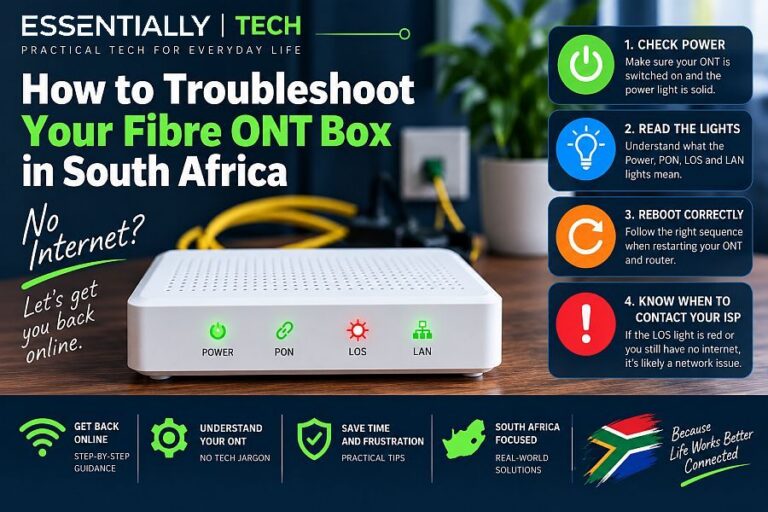
Depending on your fibre provider, it may be a small wall-mounted box with lights labelled things such as:
Power • PON • LOS • LAN
2. The Router
The router normally connects to the ONT with an Ethernet cable.
It creates your home network and provides Wi-Fi to your phones, TVs, laptops and smart devices.
In simple terms:
Fibre → ONT → Router → Your Devices
And here is the important part:
Both the ONT and router need electricity.
Keeping only the router powered won’t help if the ONT sitting next to it is dead.
That’s one of the most common mistakes people make when trying to keep their fibre running during a power failure.
Openserve itself describes the ONT as the fibre device installed at the premises; in some newer installations the ONT and Wi-Fi functionality can even be combined into one device.
The Simple Solution: A Mini UPS
A mini UPS is essentially a small rechargeable battery designed to power low-voltage equipment such as:
- fibre ONTs;
- Wi-Fi routers;
- CCTV equipment;
- small network switches; and
- other low-power DC electronics.
While electricity is available, the UPS remains charged and powers the equipment.
When the mains fails, its battery takes over.
If everything is set up correctly, you may not even notice the change.
Your lights go out.
Your Wi-Fi stays on.
But Don’t Buy One Until You Check This
This is the part that matters.
A mini UPS isn’t simply a case of:
“My router has a round plug, therefore this one will work.”
Before buying or connecting anything, check three things on the power adapter for each device.
1. Voltage
Look at the router’s original power supply.
You might see something such as:
OUTPUT: 12V DC — 1A
Now check the ONT.
It might say:
OUTPUT: 12V DC — 0.5A
Or it could require a different voltage.
The UPS output voltage must match the voltage required by the device.
Do not feed 12V into a device designed for 9V simply because the plug fits.
2. Current
The device might specify:
12V 1A
That doesn’t necessarily mean it constantly consumes exactly one amp. It tells you what its power supply is designed to provide.
Your UPS must be capable of supplying at least the required current, including the combined load if it is powering several devices.
3. Connector
Unfortunately, two round DC connectors that look identical aren’t necessarily identical.
Different barrel sizes exist, and polarity matters too.
Many devices use centre-positive DC connectors, but don’t assume.
Check the markings on the original power adapter.
The Easy Calculation
Suppose we have:
ONT: 12V × 0.5A = up to 6W
Router: 12V × 1A = up to 12W
That gives us a theoretical maximum of:
6W + 12W = 18W
Actual consumption may be lower, but this gives us useful information when choosing backup power.
A UPS capable of delivering only 10W isn’t a sensible choice for an 18W potential load.
What About Battery Capacity?
This is where product advertising can become confusing.
You may see battery capacities quoted in:
mAh
while the equipment’s consumption is described in:
Watts.
They’re not directly comparable without knowing the battery voltage.
A more useful figure is watt-hours (Wh).
Very roughly:
Runtime ≈ usable battery watt-hours ÷ equipment watts
So if the UPS has 30Wh of usable energy and your ONT and router together consume 10W:
30Wh ÷ 10W ≈ 3 hours
But don’t treat that as a guaranteed runtime.
There are conversion losses, battery-management overheads, battery ageing and other factors.
So a UPS advertised as having a particular theoretical battery capacity will usually provide somewhat less usable energy in the real world.
A Bigger Battery Doesn’t Always Mean a Better UPS
This deserves mentioning because online marketplaces are full of spectacular-looking battery numbers.
A huge mAh figure printed on the box doesn’t automatically tell you how long your router will run.
Ask instead:
What is the battery’s actual Wh capacity?
What DC outputs does it provide?
How much power can those outputs supply?
Can it power both devices simultaneously?
Does it automatically switch to battery when mains electricity disappears?
Those tell you far more than an enormous marketing number.
Test It Before You Actually Need It
Once everything is connected and the UPS has charged:
Pull the mains plug.
Don’t wait for the next outage to discover something doesn’t work.
Check that:
ONT stays on → Router stays on → Wi-Fi stays connected → Internet still works.
Then leave it running for an hour and see how much battery remains.
That’s far more useful than trusting the runtime printed on the box.
What If the Fibre Provider’s Equipment Also Loses Power?
Here is the catch.
A mini UPS can keep your equipment alive.
It can’t guarantee that every piece of infrastructure upstream from your house remains powered.
Fibre networks normally have backup arrangements for important network equipment, but provider-side power failures can still cause outages. There are real South African examples where fibre service has gone offline because upstream infrastructure lost power.
So:
Mini UPS = your equipment stays powered.
It does not mean:
Fibre can never go down during a blackout.
That’s an important distinction.
If Everything Is Powered but the Internet Is Still Down
Look at the ONT.
If it has power but shows an abnormal optical/fibre status — particularly a red LOS light on models that use that indicator — the problem may be the fibre connection rather than your electricity backup.
And that leads neatly to our existing guide:
How to Troubleshoot Your Fibre ONT Box in South Africa
If the fibre network itself has failed, then we have Plan B:
Fibre Down? Keep Your Smart Home Online With Your Phone
What About a Normal UPS or Your Solar Inverter?
Absolutely.
If your home inverter already supplies the circuit powering the ONT and router, you may not need a mini UPS at all.
A conventional 230V UPS also works.
But there’s a certain inefficiency in taking battery DC, converting it to 230V AC, feeding that into two little power adapters, and converting it back down to 12V DC.
A good DC mini UPS can be a neat solution because these devices already operate on low-voltage DC.
It is also silent, compact and dedicated to one job:
Keep the internet alive.
One Particularly Useful Setup
If your ONT and router are next to each other and both use compatible voltages, a suitable multi-output mini UPS can potentially power both.
That gives you:
Wall power
↓
Mini UPS
↓
ONT + Router
↓
Wi-Fi stays alive
No intervention required.
That’s exactly what backup power should do.
Don’t Forget Your Mesh Wi-Fi
Here’s a sneaky one.
Perhaps your ONT and main router stay alive beautifully…
…but the rest of the house still loses Wi-Fi.
Why?
Because your mesh nodes or additional access points lost power.
If your home uses multiple Wi-Fi access points, mesh units or network switches, think about which of those also need backup power.
You don’t necessarily need to keep the entire network running.
You might decide that during an outage the main router provides enough emergency Wi-Fi coverage, while the secondary nodes remain off.
That’s often the sensible compromise.
And Don’t Forget the Smart Home
This is where our recent articles join together.
Keeping the ONT and router powered can also keep your:
smart switches, inverter monitoring, Wi-Fi cameras, alarms and other connected equipment online.
So the little UPS isn’t necessarily just keeping Netflix running.
It can be maintaining part of your home’s communications and monitoring infrastructure.
Essentially: The TL;DR
If your fibre dies every time the electricity goes off, don’t immediately blame the fibre network.
Check what is powering your equipment.
You normally need to keep both the ONT and router powered.
Before buying a mini UPS:
1. Check the voltage of the ONT.
2. Check the voltage of the router.
3. Check their current requirements.
4. Check the connector sizes and polarity.
5. Make sure the UPS can handle the combined load.
6. Look at usable watt-hours rather than being impressed by a giant mAh number.
7. Test the whole system by actually switching off the mains.
“Remember : Keeping your router alive isn’t enough if your ONT is dead.”
— Essentially